
SaaS Interface in HTML6 for Uploading Files
[This post is a concept study exploring an imaginary feature integration.]
Since Windows XP, the operating system has featured a “Send to” option in the right-click context menu (which is still present in Windows 7 and Windows 8). This allows you to select a file, right-click, and quickly send it to various destinations like a flash drive, a Desktop shortcut, or installed apps (like Skype). This shows how third-party applications can register with the operating system to simplify file transfers.
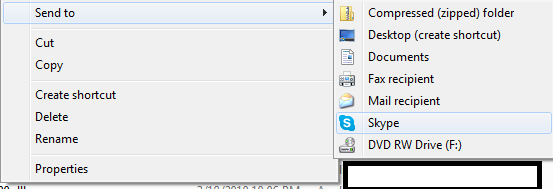
Today, many people rely on cloud storage and online tools to store files. However, modern HTML5 drag-and-drop file uploaders require you to have the website open and navigate to the specific upload page first.
This drag-and-drop approach works fine if you are already on the site, but it is less convenient when you want to upload files without keeping the browser tab open.
In this post, I want to propose a concept for a built-in browser/OS integration: the SaaS File Upload API. If a website supports this API, visiting the site will prompt the browser to register an OS-level integration, allowing you to upload files directly from your system explorer.
How It Works
This feature would be activated based on two rules:
- User Consent: The feature is disabled by default for each website until explicitly allowed by the user.
- Site Rules: The API respects site-specific rules, such as file size limits and allowed file extensions (e.g., a resume site might restrict uploads to
.docor.pdfformats).
How the Browser Detects SaaS Upload Support
The website would declare its SaaS upload endpoint using a metadata tag in the HTML source:
<meta name="sass-upload-api" path="/upload.json"/>
The referenced upload.json file defines the rules and routes for the service:
{
  "cookie_name": "ck_file",
  "maximum_allowed_perday": 24,
  "allowed_file_extensions": "*.png,*.jpg,*.jpeg,*.gif",
  "method": [
    {
      "get": "file/get",
      "routing": "/file/get/{fileName}"
    },
    {
      "post": "file/post",
      "routing": "/file/post/{fileName}"
    },
    {
      "delete": "file/delete",
      "routing": "/file/delete/{fileName}"
    },
    {
      "put": "file/put",
      "routing": "/file/put/{fileName}"
    },
    {
      "all": "file/all",
      "routing": "/file/all/{fileName}"
    }
  ]
}
- Authentication: The defined
cookie_namewould be shared with the OS-level helper service so that files are securely uploaded to your authenticated account without exposing your other browser cookies. - Routes: The endpoints handle GET, POST, DELETE, and PUT actions, allowing you to view your remote directories as a virtual folder structure locally.
Once the API is active for a site like example.com, the operating system’s file explorer would include a “Send to example.com” option in the right-click menu. Selecting this option would open a lightweight dialog showing the destination folders and upload progress without needing to open the full web browser.
For performance and reliability, large files could be transferred over FTP or specialized background protocols.
Why This is Useful
- Inline File Selection: When writing a post on a site like Stack Overflow, instead of searching your hard drive through a file picker, you could immediately select from files you recently pushed to your site’s temporary storage.
- Simplified Cloud Backups: You could back up files to your favorite cloud service straight from your desktop, eliminating the need to drag files into browser windows.
 This concept remains in the experimental phase. I will update this post as the specifications evolve.